Binary Translator – Text ⇄ Binary Converter
What is it
What is a Binary Translator?
A binary translator is a tool that converts human-readable text into binary code, which is the fundamental language of computers. Binary code consists entirely of 0s and 1s, representing the two electronic states (off/on) inside every digital device. Our enhanced binary code translator goes well beyond basic ASCII: it supports UTF-8, UTF-16, UTF-32, and Latin-1 (ISO-8859-1) character encodings, and lets you view the output in binary, hexadecimal, octal, or decimal — making it the most flexible free binary language translator available online.
Whether you need a simple 0 and 1 code translator for a school exercise or a full Unicode-aware encoder for developer debugging, this tool covers every use case. Paste in Arabic text, Chinese characters, emoji, or extended Latin — and see exactly how each character encodes to bytes in the encoding of your choice.
Encodings explained
Understanding Character Encodings
The encoding you choose fundamentally changes how text is stored as bytes. Here is a comparison of the five encodings supported by this binary code translator:
| Encoding | Bytes per Char | Supports | Best For |
|---|---|---|---|
| ASCII | 1 byte (7-bit) | Basic English (0–127) | English-only text, legacy systems |
| Latin-1 / ISO-8859-1 | 1 byte (8-bit) | Western European (0–255) | French, German, Spanish, Portuguese |
| UTF-8 | 1–4 bytes (variable) | All Unicode (1.1M+ chars) | Web, APIs, modern apps, emoji, CJK |
| UTF-16 LE | 2 or 4 bytes | All Unicode via surrogate pairs | Windows APIs, Java, JavaScript internals |
| UTF-32 | 4 bytes fixed | All Unicode, no surrogates | Simple processing, academic analysis |
Step-by-step guide
How to Use This Binary Code Translator
Converting Text → Binary (or Hex / Octal / Decimal)
- Select the Text → Encoded tab (active by default).
- Choose your Character Encoding from the dropdown: ASCII, Latin-1, UTF-8, UTF-16 LE, or UTF-32.
- Choose your Output Base: Binary (base-2), Hexadecimal, Octal, or Decimal.
- Choose a Byte Separator: space, none, newline, dash, or pipe.
- Type or paste any text — including emoji, Arabic, or Chinese — in the left panel. The encoded output appears instantly on the right.
- The Stats panel shows your character count, byte count, total bit count, and current encoding.
- Click ⎘ Copy above the output to copy to your clipboard.
Converting Encoded → Text (Binary / Hex / Octal / Decimal → Text)
- Click the Encoded → Text tab.
- Select the same encoding and base that was used to produce the encoded string.
- Paste your encoded sequence into the left panel. Groups should be separated by spaces (or match the separator used during encoding).
- The tool validates input, decodes each byte group, and reconstructs the original text on the right.
- Errors (invalid chars, incomplete bytes, out-of-range values) are shown in red with the exact invalid token highlighted.
Unlike a binary translator camera or binary image translator that requires OCR, this tool handles direct text input. If you have binary in a photo, use any OCR app to extract the digits and paste them here.
Use cases
Why Convert Text to Binary or Other Encodings?
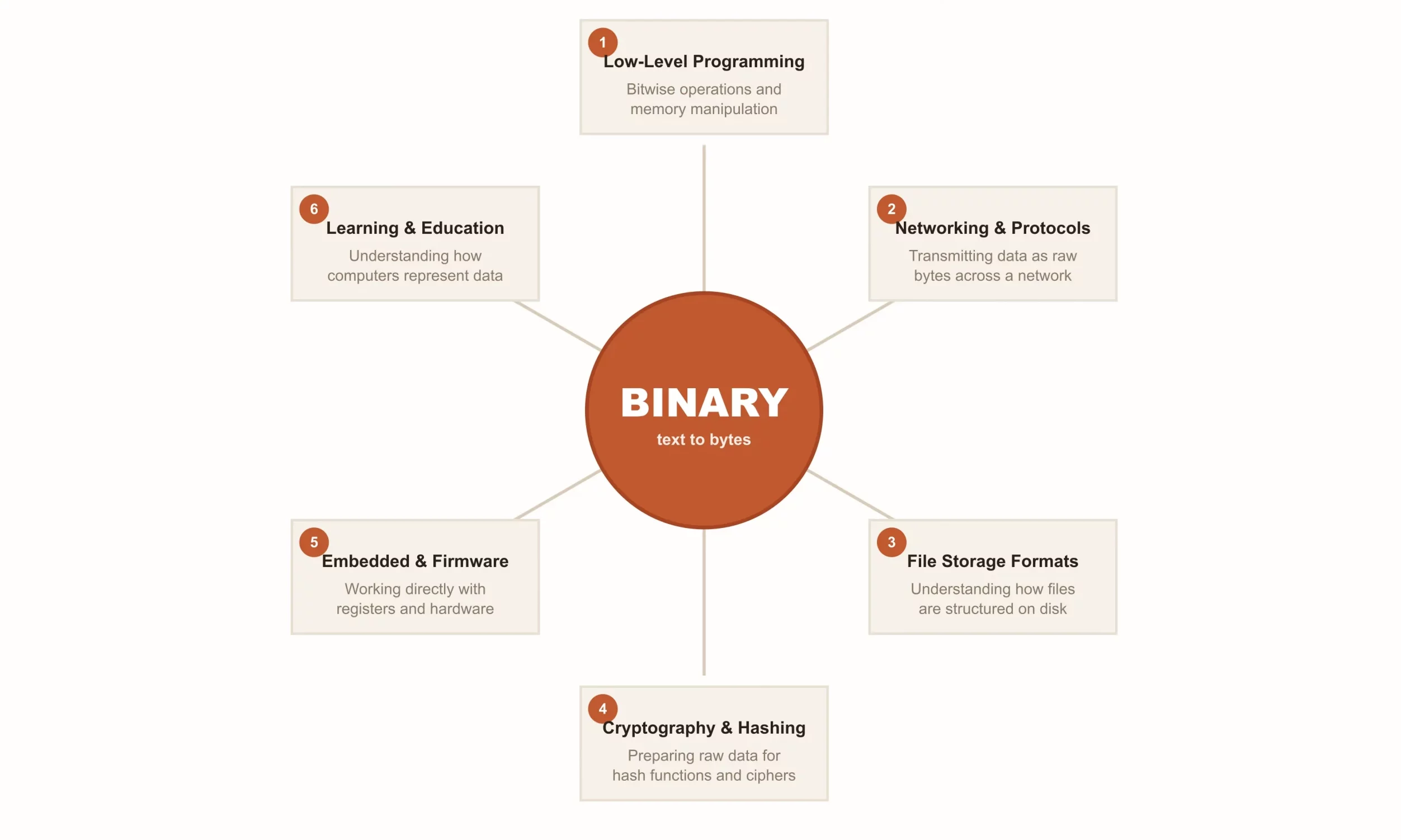
- Learning computer science: See firsthand how UTF-8 expands an emoji to 4 bytes and a Latin letter stays at 1. This is the core of how the binary language translator concept works in real systems.
- Web and API debugging: Diagnose encoding mismatches between services by inspecting the raw byte sequence of a string.
- Understanding hex dumps: Developers reading hex editors or network packet dumps can paste hex values and decode them to text instantly.
- Cryptography fundamentals: Many encryption and hashing algorithms operate on raw bytes. Seeing those bytes in binary or hex is the first step to understanding them.
- Encoding secret messages: Binary is a fun way to hide text. The string
0110001001101111011110000110010101101100decodes to “boxel” — try pasting it in Binary → Text mode with UTF-8 encoding and no-space separator. - Teaching data representation: Teachers can demonstrate exactly why
01001 binary codefragments or00110 binarypatterns differ depending on encoding context. - Binary file translation concepts: While a full binary file translator handles compiled binaries, understanding byte-level text encoding is a prerequisite for that work.
Frequently Asked Questions
How do you translate binary code to English?
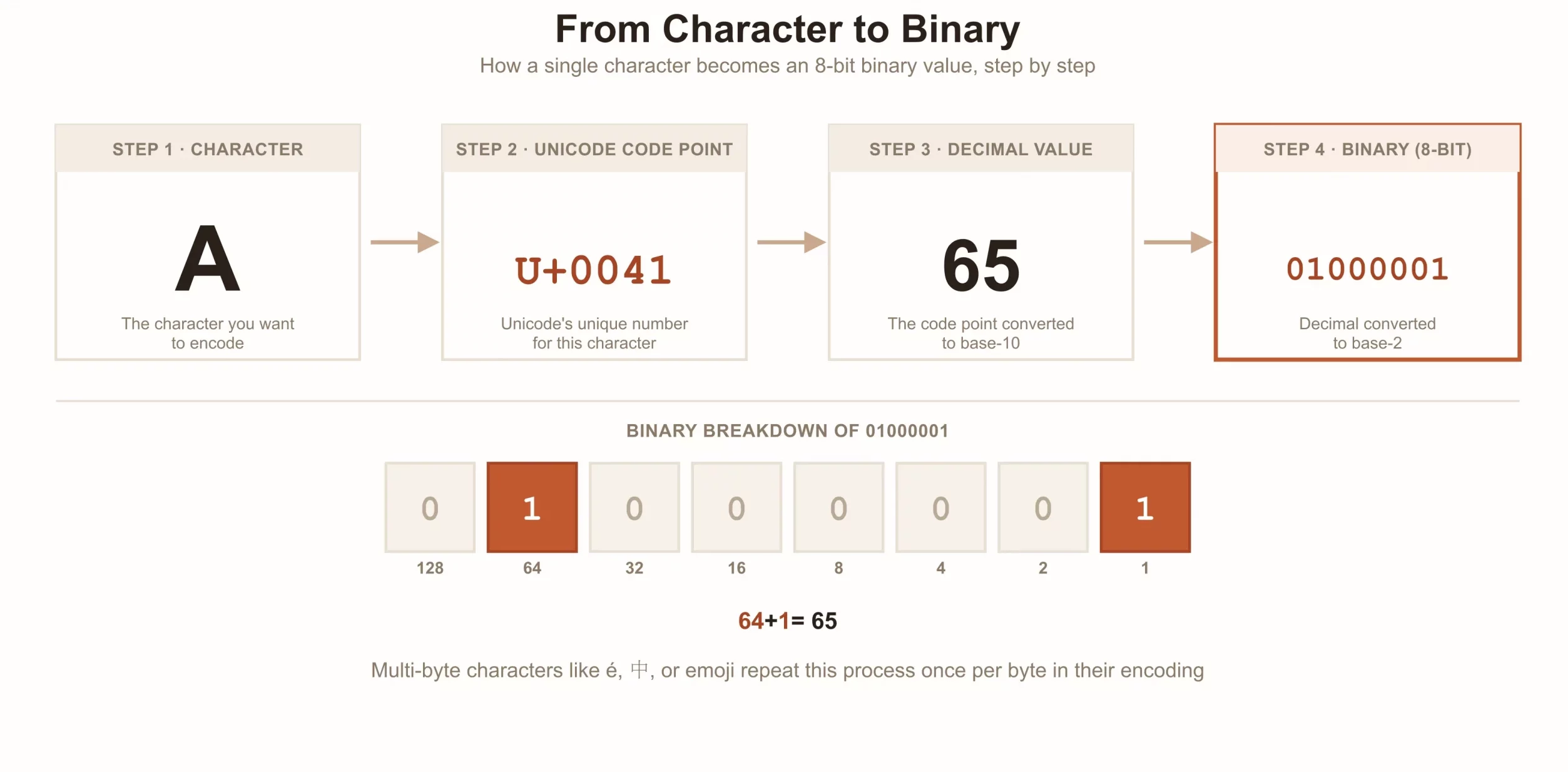
Split the binary string into 8-bit groups (for standard ASCII/UTF-8 Latin), convert each from base-2 to a decimal number, then map that number to an ASCII character. For example, 01000001 = 65 = “A”. This binary translator to English automates the entire process — switch to the Encoded → Text tab, choose UTF-8 and Binary base, paste your sequence, and the decoded text appears instantly. For multi-byte UTF-8 characters (emoji, CJK), consecutive bytes are combined and decoded as a single Unicode code point.
What is 01000001 in binary?
01000001 in binary equals decimal 65, which is the uppercase letter “A” in ASCII and UTF-8. You can verify this with our binary code translator — paste 01000001 in Encoded → Text mode with UTF-8 + Binary settings. Likewise, 01000010 = “B”, 01000011 = “C”. In hex, “A” is 0x41; in octal it is 101; in decimal it is 65.
What is the difference between ASCII, UTF-8, UTF-16, and UTF-32?
ASCII uses 1 byte per character and only covers 128 characters (basic English). Latin-1 extends that to 256 characters covering Western European letters. UTF-8 is variable-length (1–4 bytes) and covers all 1.1 million Unicode code points while staying backward-compatible with ASCII. UTF-16 LE uses 2 bytes for most characters and 4 bytes (surrogate pairs) for rare ones — used internally by Windows and JavaScript. UTF-32 always uses exactly 4 bytes per character, making it simple to process but memory-inefficient. This binary language translator lets you switch between all of them so you can see the difference directly in the byte output.
Can I translate emoji or Chinese characters to binary?
Yes — this is one of the key features that sets this tool apart from basic binary code translators. Select UTF-8 encoding and paste any emoji (e.g. 😀) or CJK character (e.g. 中). The tool uses the browser’s native TextEncoder API to produce the correct multi-byte UTF-8 byte sequence. For example, 😀 encodes to 4 bytes: 11110000 10011111 10011000 10000000 in binary or F0 9F 98 80 in hex. No other free binary translator online handles emoji encoding this way.
Can I use this as a binary picture or photo translator?
This tool handles text-based encoding. A true binary photo translator or binary code image translator would need OCR (Optical Character Recognition) to read binary digits from an image first. However, you can photograph any printed binary text, run it through a free OCR app, copy the extracted digits, and paste them here in Encoded → Text mode. Future versions may include a binary image translator upload feature with built-in OCR.
Is this a free binary translator online?
Yes. This is a completely free binary translator with no registration, no download, and no limits. It runs 100% in your browser using native JavaScript APIs — no data is sent to any server. It’s a more powerful alternative to a generic Google binary translator or binary to English translator Google search result, with real encoding options, stats, and multi-base output built in.
How does UTF-8 encode Arabic or Hebrew text to binary?
Arabic and Hebrew characters fall in the Unicode range U+0600–U+06FF and U+0590–U+05FF respectively. In UTF-8, code points in the range U+0080–U+07FF are encoded as 2 bytes. For example, the Arabic letter م (U+0645) encodes to the bytes 0xD9 0x85, which in binary is 11011001 10000101. You can verify this by clicking the “مرحبا” sample button in Text → Encoded mode with UTF-8 + Binary selected. This is the kind of deep detail that most binary text reader tools skip over entirely.
Binary Translator for Developers and Students
Whether you’re a computer science student exploring how the 0 1 code translator works, a backend developer debugging a character encoding bug, or a security researcher inspecting byte sequences, this tool is built for precision. It uses the browser’s native TextEncoder and TextDecoder APIs for guaranteed standards-compliant output — the same engines used by Node.js and modern browsers. Unlike a generic google binary translator result, you get full control over encoding, base, separator, and padding. Bookmark this as your go-to binary text reader and free binary translator online.
Related tools
More Developer Tools
More developer tools
Browse every free tool in the Developer Tools category — UUID, Binary, and more.